
__d.house's post
1 / 3
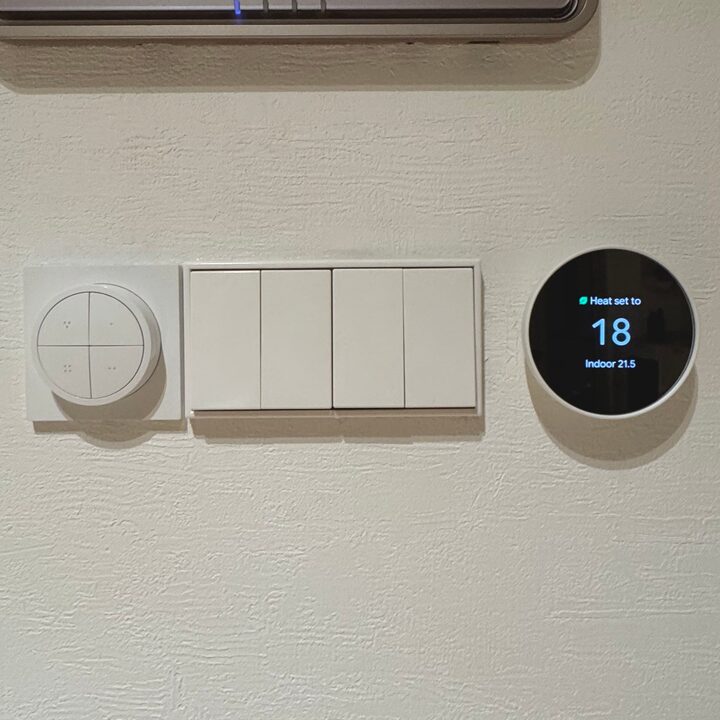
The lighting and heating in the living room are controlled by Philips Hue Tap Dial, Yung Switch 4-hole, Google Nest Thermostat. I can control it with my phone by attaching it to SmartThings. ✔️Philips Hue Tap Dial Switch This switch can be connected to Philips Hue smart lighting. You can assign lights to each of the 4 switches to turn them on/off, change the color temperature, and control dimming by turning the switch. Also, since the back is magnetic, you can attach it to any place in the house where magnets stick. I'm using it by connecting it to the living room strip lighting, bedroom stand lighting, and balcony pendant lighting. The product sold in Korea is rectangular, but I bought a square product through direct purchase from Europe to attach it next to the Yung Switch. ✔️Yungsswitch 4-hole Yungsswitch is all you need if you remodel.. but I bought a momentary type (push type) directly from Germany to put an inner switch inside to make it function as an IoT. When you turn the light on and off, the switch position does not change and clicks and returns to its original position. This type of switch cannot be used as a general light without an inner switch..! I used a Sihas product for the inner switch. ✔️Google Nest Thermostat I chose this thermostat solely because of its design. It is still warm in the south-facing house, so I have not turned on the heating.. I am still curious about how it is used in real life! I purchased it and entrusted the installation to a separate company. I installed a total of 4 units in the living room, master bedroom, small room, and dressing room. #YungSwitch #필립스휴 #iot #iot조명 #iot스위치 #구글네스트 #온도조절기 #반셀프인테리어 #반셀인 #타워형거실 #타워형아파트 #30평대인테리어 #다운라이트 #스마트싱스 #스마트전구 #화이트앤우드 #스위치 #독일직구 #유럽직구
- 2024.12.03
- Likes
- 14
- Saved
- 17
- Views
- 300
Comments0
