
어흥어흥야옹's post
10 / 10
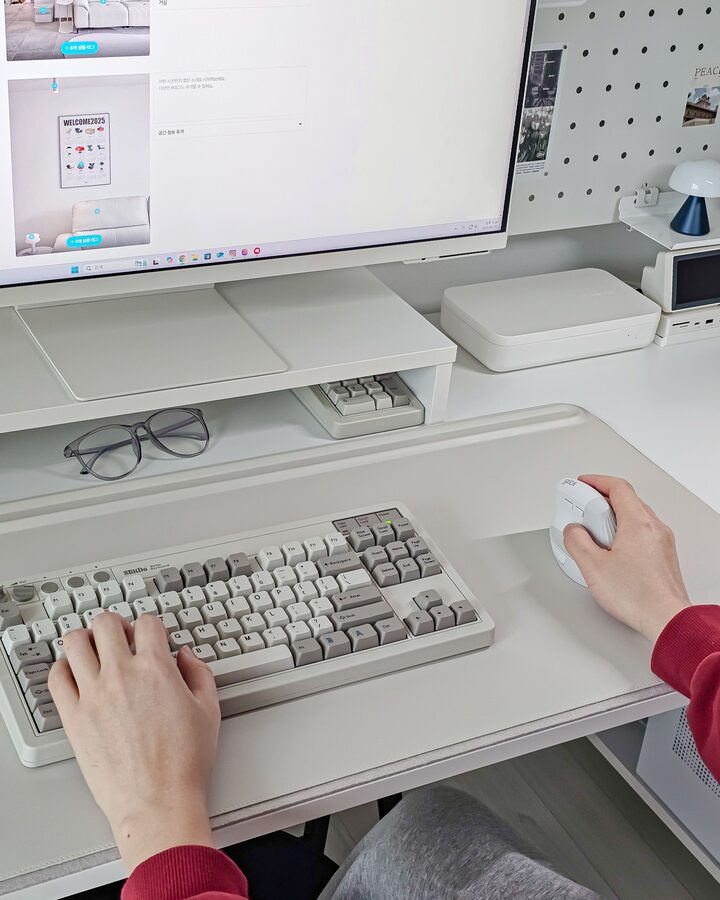
#제품제공 I spend a lot of time at home on my desk these days because I work a lot in the office. When I work for a long time, I suddenly feel a burden on my wrist. I want to introduce you to the OP50 mouse from G-Clicker, which is a cost-effective mouse with a reasonable price and added convenience. I felt that it was convenient to use, such as switching forward/backward and adjusting DPI with an ergonomic vertical design that reduces the burden on my wrist, and the 7-button design. In particular, the Boss Key, which returns to the desktop with one touch, felt like a new world of functions when I used it. The 2.4Ghz wireless connection using Bluetooth 5.0 and a receiver was seamless, and it was easy to move the pointer delicately because it was possible to adjust the DPI in 4 stages. I can use not only the Windows operating system that I use, but also tablets and iOS, but I have connected it to my smart monitor via Bluetooth, so I can use it on multiple devices with just one mouse without turning on the PC. The desk here is in the bedroom, and it is a quiet, noiseless mouse, so it would be good to use in a conference room or library. It's the same It can be used by charging with Type C, and it seems like a really big advantage that you can find all these advantages at a price in the mid-20,000 won range! This mouse has a minimalist design and is highly recommended for those who want to decorate their desks neatly. #Product sponsorship #지클릭커 #키보드 #무선키보드 #무선마우스 #블루투스키보드 #무소음키보드 #키보드추천 #데스크테리어템 #갓성비키보드 #예쁜키보드 #방수키보드 #충격방지키보드 #Mouse #버티컬마우스 #인체공학마우스 #OP50 #마우스추천 #무선마우스 #블루투스마우스 #저소음마우스 #데스크테리어 #데스크셋업 #데스크꾸미기
- 2025.01.27
- Likes
- 11
- Saved
- 2
- Views
- 170
Comments0
